InventoryTell WEDO which components go into each Shopify product. Orders auto-decrement the right raw materials. Production runs push finished stock to Shopify. No spreadsheets, no duplicate "products," no manual reconciliation.
14-day free trial on paid plans. Free tier never expires.
One atomic transaction. Every line item in the BOM. Audit row per change.
Native inventoryAdjustQuantities mutation. No mirror database. No drift.
Grouped by supplier. Rounded to minimum order quantity. Ready to send.
Shopify tracks the kit. It doesn't know what's inside.
Every kit that sells means hunting down components in a spreadsheet and adjusting each by hand. By Friday the spreadsheet doesn't match the shelves.
Your kit shows "in stock" while you're three units away from running out of a $0.50 plastic clip that goes inside. Shopify can't warn you.
"Order more of everything from Acme, I think we're low" is how most small manufacturers buy. WEDO turns it into one click per supplier.
Four steps. The first three you do once. The fourth happens every time someone orders.
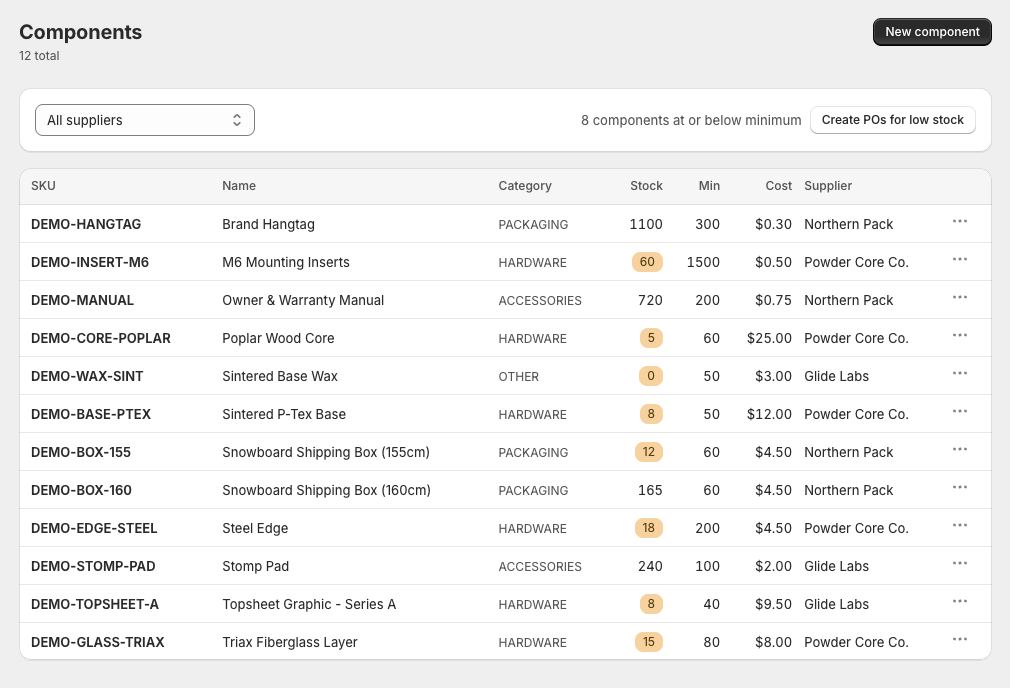
Every raw part, packaging piece, and accessory you keep on a shelf. Set unit cost, minimum stock, supplier, and supplier MOQ. Low-stock badges fire automatically.
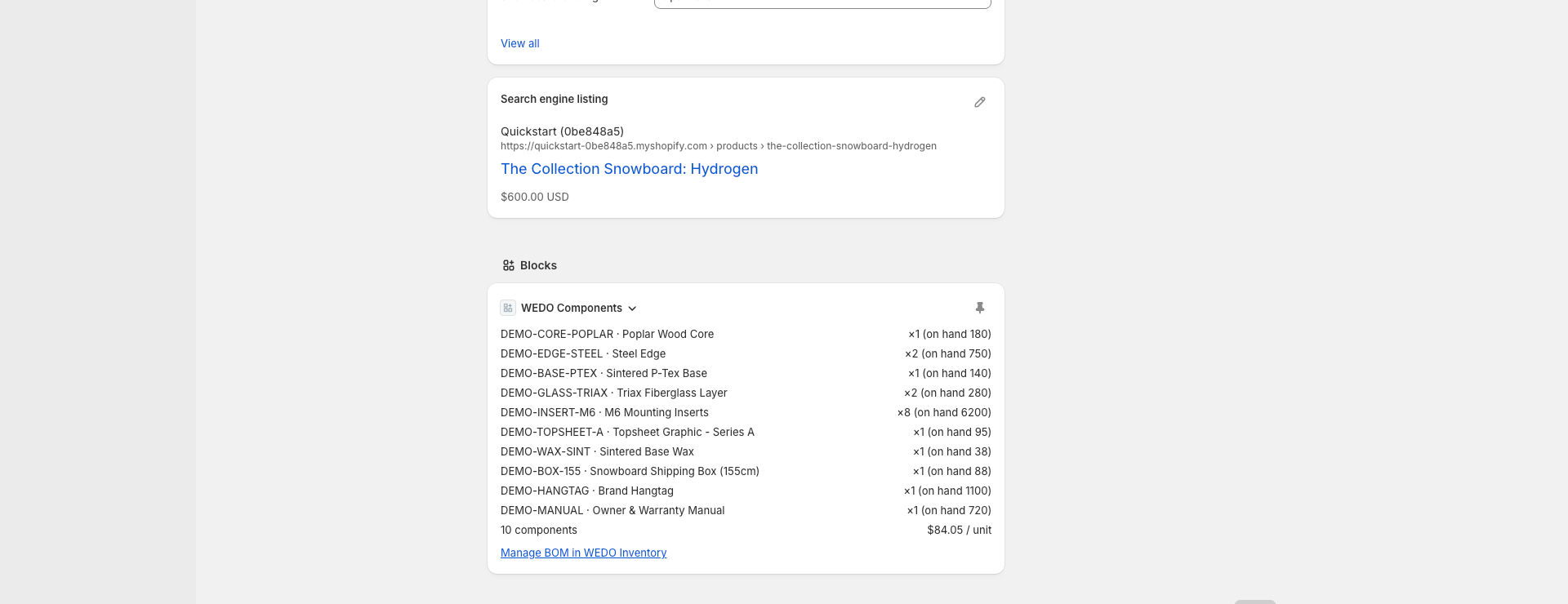
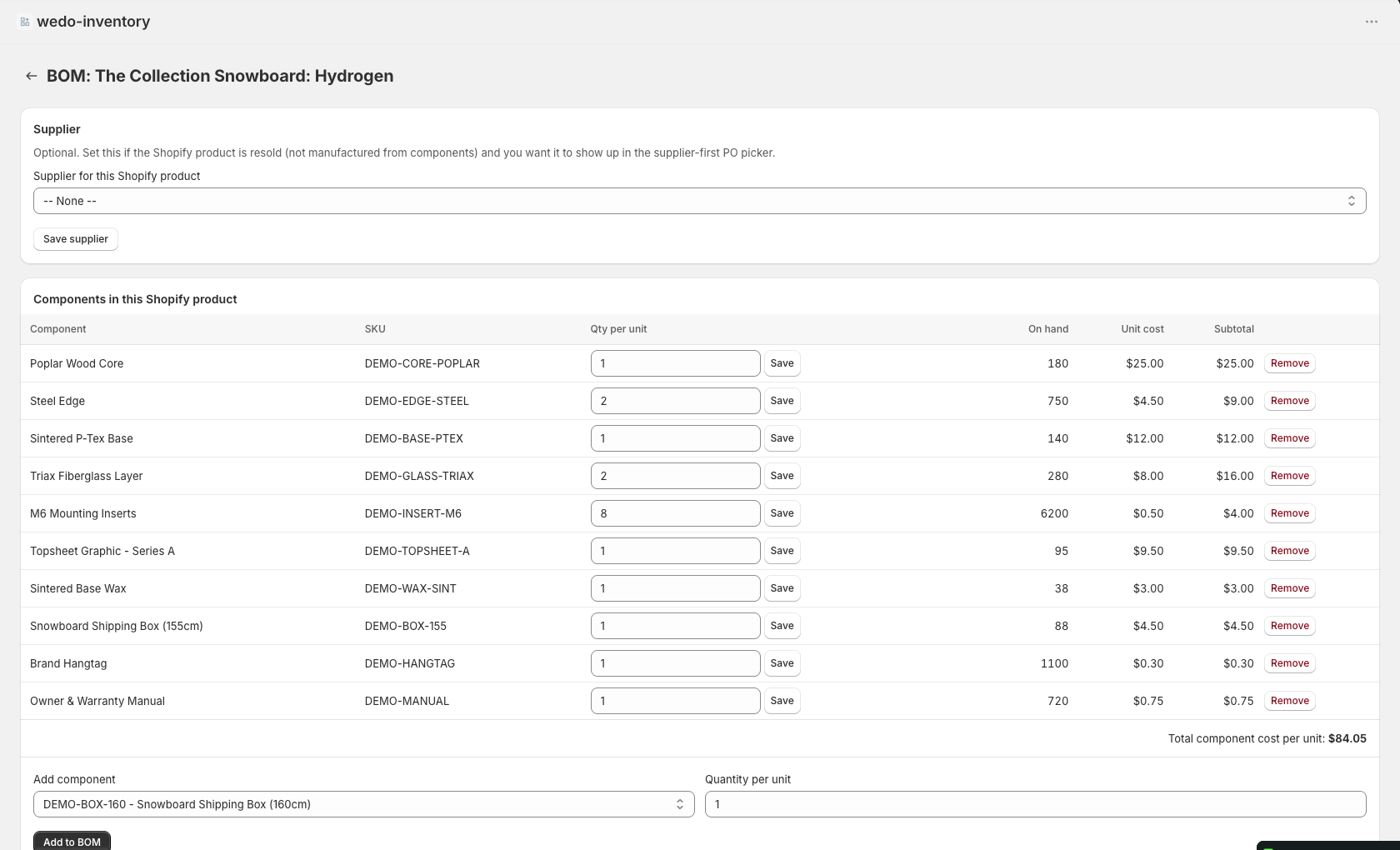
A WEDO Components block lives directly on every Shopify product editor. Pin it once, click "Set up BOM," save. No mirror "WEDO product" to create — the BOM attaches to the Shopify product itself.
Mark each component (and any Shopify products you resell) with a supplier. Now WEDO can build purchase orders for everything low — one PO per supplier, never a synthetic bucket.
Orders fire a webhook that decrements components per BOM. Production runs decrement components and push finished stock to Shopify via the Inventory API. PO receipts credit the right side. Everything logged.
Built for small manufacturers who sell on Shopify. No ERP weight, no fake "kits" duplication.
Read-only BOM summary appears inline in Shopify's product editor. One click deep-links to the BOM editor for that product. Pinable.
Each raw material has its own stock counter, minimum threshold, unit cost, and audit log. Every change records who/what/when, including Shopify order id when a sale was the cause.
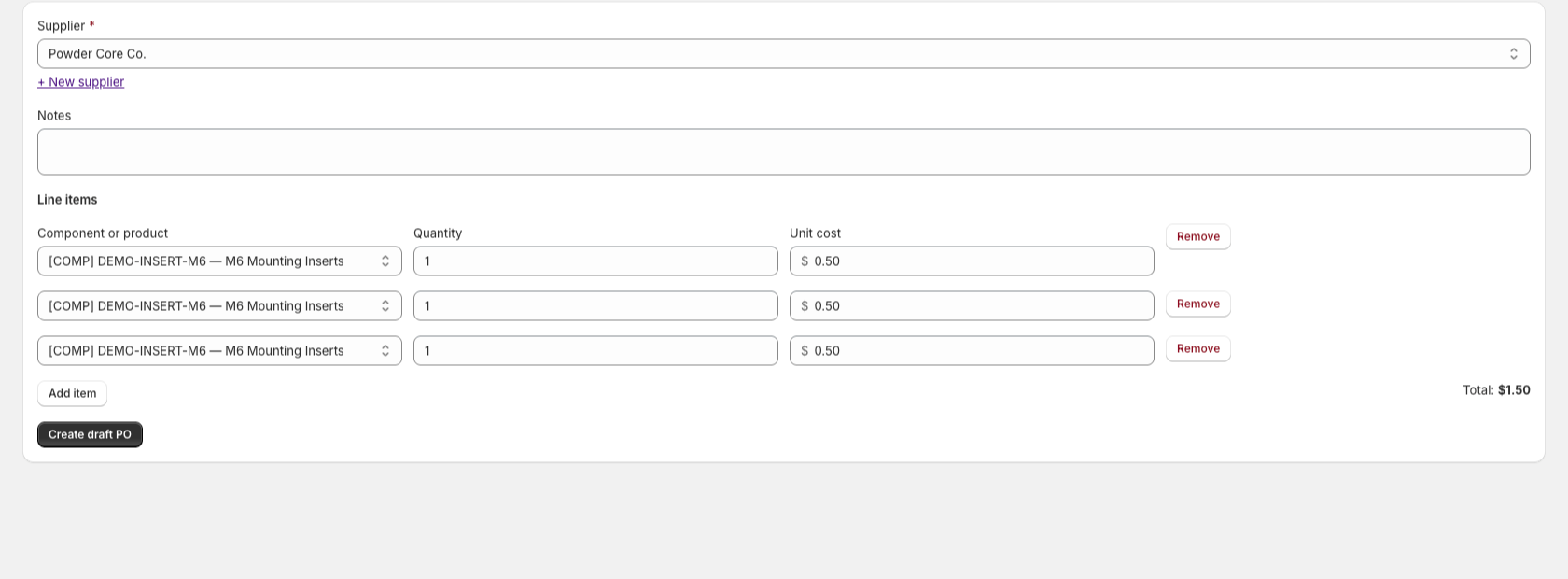
Pick a supplier; the line-item picker filters to that vendor's components AND any Shopify products you sell as resale items. One PO can mix raw materials and finished resale goods from the same vendor.
Set a minimum order quantity on a supplier; every shortfall the calculator produces rounds up to the next multiple. POs go out at quantities your supplier will actually accept.
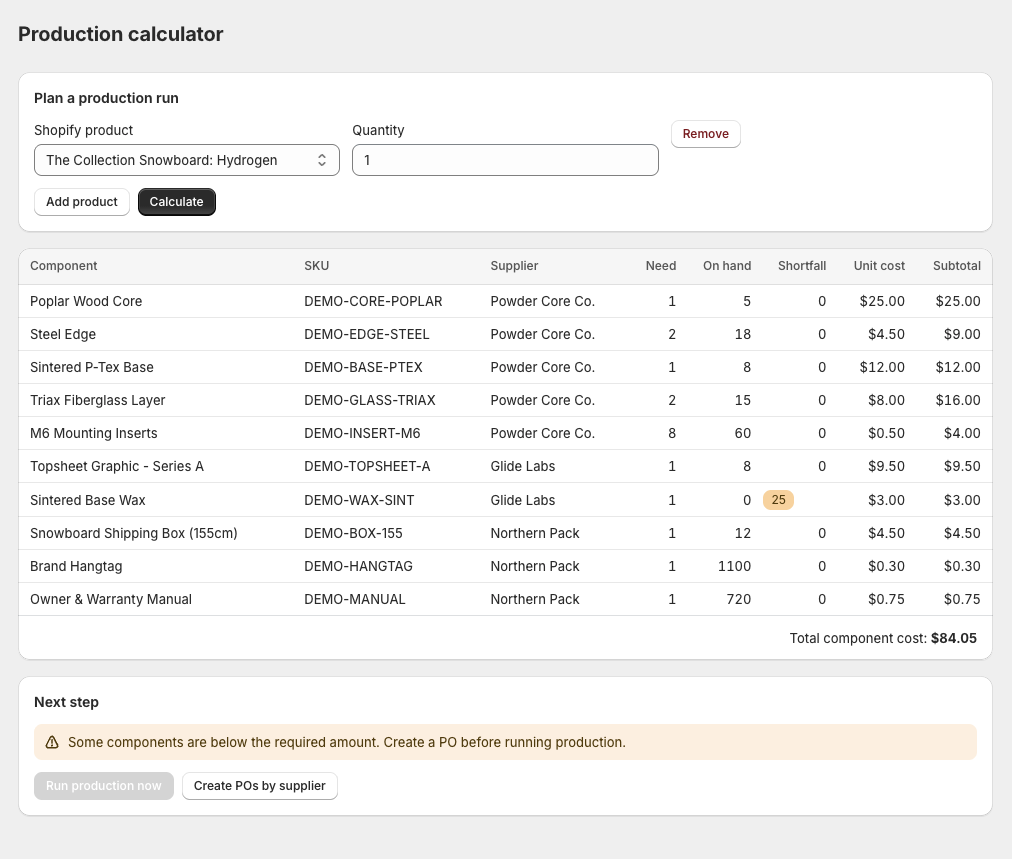
Pick the products to build and quantities, hit Calculate. WEDO shows what you have, what you're short, and groups shortfalls into one PO per supplier with one click.
Production runs and PO receipts push inventoryAdjustQuantitiesto Shopify. Your finished-goods stock counter stays accurate without you touching it.
Five screens that cover the full loop — catalog, BOM, restock, build, ship.
A read-only block lists every component and its on-hand stock without leaving the product page. Pin it once, it appears on every product.

Why it matters. Most BOM apps make you jump to a separate workspace. This one lives where your team already works.
Add components, set quantities per unit, tag a supplier — all keyed to the Shopify product. No mirror product in our database to keep in sync.

Why it matters. One source of truth for "what makes a kit." Rename or delete the Shopify product and the BOM goes with it.
Filter your raw-material catalog by supplier. Low-stock badges light up the moment a component drops below its minimum — 8 in this view. One click on "Create POs for low stock" generates per-supplier purchase orders for every shortfall, rounded up to each supplier's MOQ.

Why it matters. Restocking shifts from "guess what we're low on" to "click, send."
Pick a supplier and the line-item dropdown filters to that supplier's components AND any Shopify products you sell as resale items. The unit cost pre-fills from the component's catalog cost.

Why it matters. Email a supplier the PO that's actually theirs. Mark received, and Shopify finished-goods stock updates automatically for resold products.
Pick the kits, set quantities, hit Calculate. The table shows per-component need, on-hand stock, supplier, and shortfall. Notice the Sintered Base Wax row — the merchant needs 1, has 0, and the shortfall reads 25 because the supplier's MOQ is 25. The PO that the next click generates will order 25 units, not 1.

Why it matters. The shortest path from "we have an order" to "we have the parts" is fewer screens than the spreadsheet you were going to open.
Or a "kit" plugin? Or a full ERP?
Free for one product. Paid plans unlock automatic order decrement and the purchase-order workflow.
Common questions before you install.
No. The BOM attaches directly to a Shopify product by its id. No "WEDO product" mirror to keep in sync.
In Shopify. WEDO tracks raw material (component) stock; it pushes deltas to Shopify when a production run finishes or a Shopify-product PO line is received.
v1 credits inventory to the first variant. Multi-variant BOMs are on the roadmap.
Only the line items and product ids from order webhooks. We don't read customer name, email, phone, or address. Our protected customer data declaration explicitly excludes them.
read_inventory, read_orders, read_products, write_inventory, write_products. Inventory writes are used for production runs and PO receipts.
Yes — on Pro. Component catalog, BOM definitions, and stock history are all exportable as CSV.
Enter your Shopify store domain. Install takes about 30 seconds. Free tier doesn't expire.
No credit card required.